University of Edinburgh
Department of Computer Science
Notes on
IMP
Programming
by
P. D. Schofield
Lecture Notes
James Clerk Maxwell Building Revised:
The King's Buildings October 1977
Mayfield Road
Edinburgh
EH9 3JZ
___________________________________________________________________________
PROGRAMMING IN IMP
These notes started as lecture notes for students of Computer Science 1, using the
IMP language on E.M.A.S. (The Edinburgh Multi-Access System), but have been revised
slightly in an attempt to make them also of some use to other groups. There are
still some references to special facilities provided for the Computer Science 1
class, but the text makes it clear when these occur.
It is particularly important that anyone intending to input IMP programs on cards
should look at Appendix A, note (3), and find out what convention they have to
observe in regard to the quotation mark character (").
More detailed descriptions of IMP as implemented on any particular Computer Science
or E.R.C.C. machine may be obtained from the Computer Science Department or E.R.C.C.
respectively.
P.D. Schofield.
CONTENTS
SECTION 1 - INTRODUCTION
SECTION 2 - DECLARATIONS
SECTION 3 - SOME BASIC ROUTINES
SECTION 4 - CONDITIONAL INSTRUCTIONS
SECTION 5 - REPETITION LOOPS (cycle, while, until)
SECTION 6 - LIBRARY ROUTINES AND FUNCTIONS
SECTION 7 - MORE OPERATIONS ON STRINGS
SECTION 8 - NUMERICAL AND STRING EXPRESSIONS
SECTION 9 - INNER BLOCKS - LOCAL AND GLOBAL VARIABLES
SECTION 10 - DEFINING NEW ROUTINES AND FUNCTIONS
SECTION 11 - RECURSIVE ROUTINES AND FUNCTIONS
SECTION 12 - EXTERNAL ROUTINES AND FUNCTIONS
SECTION 13 - OWN VARIABLES
SECTION 14 - BYTE INTEGER, LONG REAL VARIABLES
SECTION 15 - RECORD VARIABLES
SECTION 16 - ROUTINE- AND FUNCTION-TYPE PARAMETERS
SECTION 17 - INPUT AND OUTPUT STREAMS
SECTION 18 - SYMBOLS
SECTION 19 - POINTER VARIABLES
SECTION 20 - MAPPING FUNCTIONS
SECTION 21 - JUMPS, LABELS AND SWITCHES
APPENDIX A - INPUT CONVENTIONS AT CONSOLES AND CARD PUNCHES
APPENDIX B - NOTES ON FAULT FINDING
___________________________________________________________________________
SECTION 1 : INTRODUCTION
A complete PROGRAM is used to describe the details of some computation that we wish
to have carried out. Programs can be written in a variety of different programming
languages, and these notes describe one such language, called IMP. In practically
every programming language, there are some details that vary slightly from machine
to machine, and also from time to time as improvements are made to the language.
These notes refer primarily to the version of Imp available in October 1976 on the
I.C.L. 4-75 computers, operating under the Edinburgh Multi-Access System. Users of
Imp on other machines will need to note a few minor variations. Also, the method of
submitting a program to the machine and having that program run will vary from
machine to machine.
A minimum Imp program consists of:
(i) The keyword begin.
(ii) A list, in order, of the instructions we want carried out.
(iii) The keyword end of program.
Of the different types of instruction that may be given under (ii) above, the most
important is the call of a ROUTINE. A routine call is an instruction to carry out
some standard sequence of operations, achieving some frequently required end.
Many routines have been defined as a basic part of Imp, and are permanently available
for all to use; later on, we shall see how additional routines can be defined by the
programmer (and his colleagues) to suit the needs of their particular field of
interest. In the case of students, yet another set of routines is sometimes defined
by a lecturer and made available to his class.
To call a routine, we simply write down the NAME of the required routine, followed
in most cases by some supplementary information that is placed in brackets after
the name. Very often, the name of the routine will give a good idea of what it does.
If we are exceptionally fortunate, or our needs are very simple, there is the slight
chance that the combination of just one or two of the routines available to us will
correspond exactly to the whole computation we require. An example is given on the
following page.
___________________________________________________________________________
begin
PRINT TABLE OF (9)
end of program
The routine PRINT TABLE OF, used here to provide an exceptionally brief first example,
is clearly of extremely limited value; although it does happen to be in the library
of special routines available to Computer Science 1 students in Edinburgh, it is not
generally available to, nor likely to be required by others. It causes a simple
multiplication table (as met in ones earliest schooldays) to beprinted at the
appropriate output device (the console, if the program is being run from a console;
usually a Line Printer in other cases). The supplementary information given in
brackets (officially called a PARAMETER) determines that it will be a 9-times table
that is produced, though any other integer (i.e. whole number) could have been given.
To write more useful programs, we shall have to study a list of the more common
library routines available, and build up what we require from these. In addition,
we shall need to consider:
(i) How to allocate names to storage space (VARIABLES) in which numbers, strings
of characters, etc., can be placed by one instruction, ready for subsequent use
by a later instruction(s). (Section 2).
(ii) How to cause a choice to be made between two courses of action, depending upon
the progress of the program so far. (Section 4).
(iii) How to cause one, or a group, of instructions to be carried out several times.
(Section 5).
(iv) How to create new routines of our own, and use them. (Section 10)
Before looking at any of these in detail, let us consider a very slightly more
complex program. Suppose that we wish to write a program to print out an N-times
table, but do not know at the time of writing what value we shall want for N. The
solution is to arrange that before printing the table, our program reads as DATA
a number giving the value of N required. This is done by using a standard routine,
whose name is READ. This routine will cause data to be taken from whatever is the
appropriate source of input (the console, if the program is being run from a
console; from an extra card added after end of program if the program
___________________________________________________________________________
is being submitted on cards). Our program now begins to look like this.
READ (N)
PRINT TABLE OF (N)
The first routine reads a number as data, and stores it in a place
called N; the second uses this value of N to determine what
multiplication table to print. But before using the VARIABLE called N,
we must DECLARE our wish to have a storage location set up for this
purpose. Since, in this example, we shall only store integers in N, we
write our declaration:
integer N
Our whole program then is as follows:
begin
integer N
READ (N)
PRINT TABLE OF (N)
end of program
This is perfectly satisfactory, but let us add 2 more routine calls:
begin
integer N
READ (N)
PRINT TABLE OF (N)
PRINT STRING("THAT CONCLUDES MY FIRST PROGRAM")
NEWLINE
end of program
The PRINT STRING routine causes a string of characters - in this case
it is THAT CONCLUDES MY FIRST PROGRAM - to be sent to the output, after
the N-times table, of course. When printed on an output device, lines
of output are stored until terminated by the character which indicates
the end of a line and the start of a new one. This character is sent to
the output by calling the standard routine NEWLINE.
__________________________________________________________________
Comments
In addition to containing instructions to be obeyed, any worth-while
program will always include COMMENTS. These are pieces of program which
have NO EFFECT when the program is executed, but are inserted to serve
a different but MOST IMPORTANT function - to make the program more
legible to human readers, both the author and others. A comment
consists of the keyword comment, followed by any sequence of
characters. Note that if comments extend over two or more lines, each
line will have to start with the keyword comment.
begin
comment The purpose of this program is to print
comment out an N-times multiplication table.
integer N
READ (N)
PRINT TABLE OF (N)
PRINT STRING ("THAT CONCLUDES MY FIRST PROGRAM.")
NEWLINE
end of program
Since comments are used very widely, it is convenient to have an
alternative and shorter way of writing the keyword comment. An
exclamation mark is used for this purpose.
begin
! The purpose of this program is to print
! out an N-times multiplication table.
integer N
READ (N)
PRINT TABLE OF (N)
PRINT STRING ("THAT CONCLUDES MY FIRST PROGRAM.")
NEWLINE
end of program
__________________________________________________________________
The structure of a simple program
A program consists of a sequence of STATEMENTS. We may distinguish four
main classes of statement:
(i) DECLARATIONS. These are preparatory statements, allocating names to
various entities, chiefly variables. (e.g. integer N)
(ii) INSTRUCTIONS. These are the statements that cause things to
happen: data to be read in, values to be stored in variables,
calculations to take place and results to be output.
(iii) COMMENTS. Statements that are inserted for the benefit of the
human reader, but have no effect at run-time.
(iv) BRACKETING STATEMENTS. Statements that mark the beginning and end
of certain groups of statements. For example, begin and end of program
mark the beginning and end of a whole program. Shortly we shall meet
others, such as cycle and repeat, which mark the beginning and end of a
group of instructions to be executed several times over.
The correct order of statements in a simple program.
Comments may be placed anywhere. Apart from this, the correct order is:
(i) begin
(ii) The declarations.
(iii) The instructions, interspersed with bracketing statements as necessary.
(iv) end of program.
Two (or more) statements on one line.
In our programs so far, each statement has been written on a separate
line. If desired, however, two or more statements may be written on one
line, provided they are separated by semi-colons. For example:
READ (N); PRINT TABLE OF (N)
It is often convenient to put one instruction and a short comment upon
that instruction on the same line. For example:
READ (N); comment N determines which table is to be printed.
__________________________________________________________________
KEYWORDS, NAMES AND STRINGS
In our first program, we had examples of letters of the alphabet being
used in three different contexts:
(a) In Keywords.
In many books on programming languages, our attention is drawn to the
keywords of the language by printing them in lower-case letters and
either printing them in bold type, or by underlining them. Throughout
these notes, underlining will be used (e.g. begin). When we come to
input to the computer, however, most devices have neither lower case
nor underlining; instead we shall represent keywords with upper case
letters and prefixing with a % character (e.g. %BEGIN). See Appendix A
for details; and note that if a keyword is broken up into separate
words, as it may be for legibility, then a % character is placed in
front of each. (e.g. %END %OF %PROGRAM).
(b) In Names.
In our earlier example, we saw that we refer to routines by their
NAMES. Shortly we shall also need to allocate names to VARIABLES and,
later on, to a few other entities in the language. A name always starts
with an upper-case letter of the alphabet (A,B,C.....Z) and may be
followed by one or more digits (0,1,2,.....9), or by further letters,
or a mixture of the two.
Examples X, SUM, A2B3, PRINTSTRING
Notes (i) There is no limit on the length of a name.
(ii) Note the distinction: keywords consist of underlined
letters (marked by %), names consist of non-underlined
letters and digits.
(c) In Strings.
In our earlier example, we were concerned with the string of
characters:- THAT CONCLUDES MY FIRST PROGRAM. It was not a keyword, nor
was it the name of anything; it was simply a sequence of 32 characters
(27 letters, 4 spaces and one full stop) which we wanted manipulated as
one - in this case it was to be printed out. We mark out the extent of
the string by enclosing it between quote characters. A string may
consist of anything from 0 to 225 characters. (Some further details are
given in the section on string constants).
Note As convenient for legibility, spaces may be freely inserted almost
anywhere in a program, without altering the meaning. Hence, the routine
name PRINTSTRING, is more legible if written PRINT STRING. Two
exceptions to this are:
(i) Spaces within a string count as characters of that string.
(as one would wish).
(ii) If spaces are inserted within keywords, additional % characters
are required, as above.
__________________________________________________________________
SECTION 2 - DECLARATIONS
(i) SCALARS
Before we can use a variable we must specify what sort of variable we
want and what its name is to be. The main types of variable are:
(a) numerical (subdivided into real and integer - see below)
(b) string A string variable can store a sequence of characters.
DECLARATION MEANING
integer A, B3 I intend to use two variables which I will call A and B3.
They must be capable of storing integer (whole number) values in the
range -2147483648 to +2147483647. (That is -231 to 231−1).
real C I intend to use a variable which I will call C. It must be
capable of storing "real" values, that is a number which may be either
an integer (e.g. 17) or a number with a fractional part (e.g. 12.261).
On many current machines, the range of real numbers that can be stored
is (approximately) ±7×1075; and they are stored to (about) 7 significant decimal digits.
(This can be changed to 17 significant digits if long real variables
are declared).
string (16) S,T I intend to use two variables which I will call S and
T. They must be capable of storing strings of anything up to 16
characters each. For example:
"EDINBURGH" (9 characters)
"COMPUTER SCIENCE" (16 characters - the space counts)
When declaring a string variable, one gives an upper limit on the
length of string that can be stored. (16 in this example). The largest
upper limit permitted is 255. Thus, string (256) S would be an illegal
declaration.
Notes
(1) The compiler automatically allocates locations to the variables as
they are declared. The programmer does not need to concern himself with
where the variables are located - he always refers to them by the names
he has declared for them.
(2) When the values stored in integer variables are multiplied or added
the exact answer is produced. When doing arithmetic on real variables
the answers are "rounded off" to (about) 7 significant figures.
__________________________________________________________________
(ii) ARRAYS
We can also declare a whole array of variables, all having the same
name, but distinguished from one another by means of a "subscript",
which is written in brackets after the name of the array.
Examples
integer array D(1:4)
real array E(1:9),F,G(-3:2)
string (25) array P(1:50)
These cause the allocation of space to four integer variables D(1),
D(2), D(3) and D(4), nine real variables E(1) to E(9), twelve real
variables F(-3) to F(2) and G(-3) to G(2), and fifty string variables
(each of maximum length 25) P(1) to P(50).
Note the difference between : integer array D(1:4)
and : integer D4
The former creates four variables, of which one is referred to as D(4);
the latter creates one variable D4.
UNIQUE USE OF NAMES
Names cannot be used simultaneously for two different purposes. For
example:
integer A
integer array A(1:10)
would be faulted by the compiler.
Other types of declaration, associating names with multi-subscript
arrays and with the user's own routines, functions and predicates etc.
will be explained later. The same prohibition on simultaneous use of a
name for two purposes applies to all such declarations. (However, see
later section on local and global variables).
__________________________________________________________________
(iii) MULTI-SUBSCRIPT ARRAYS
We have already seen how to declare arrays with one subscript. Arrays
with two subscripts can also be declared.
Example Meaning
real array A(1:2,1:3) Declare 6 real variables
to be known as follows:-
A(1,1) A(1,2) A(1,3) A(2,1) A(2,2) A(2,3)
+------+------+------+------+------+------+
| | | | | | |
+------+------+------+------+------+------+
It is often easier to think of these in two dimensions, and it may be
our desire to do so that motivates the declaration of a two-subscript
array:-
+--------+--------+--------+
| A(1,1) | A(1,2) | A(1,3) |
+--------+--------+--------+
| A(2,1) | A(2,2) | A(2,3) |
+--------+--------+--------+
Arrays with more than two subscripts can be declared in a similar way:-
real array B(M:N+1,1:5,-1:3),C,D(-10:10)
integer array F(1:3,1:5,1:20,1:30)
string (20) array G,H(1:3,1:3,1:10)
Notes
(1) The maximum number of subscripts is 6.
(2) Any of the array bounds may be given as integer expressions, for
example see B above, but in this case we have to ensure that M and N
have values assigned before reaching the declaration. (Also see later
section on block structure).
__________________________________________________________________
(iv) DECLARATION OF CONSTANTS
In general, the declaration of a variable is a preparatory statement,
causing a storage location to be allocated and to be given a name. At
this stage, no value is stored in this location. Subsequently,
instructions will be given (see next section) to store a value, change
it, etc.
Sometimes it is convenient to have a storage location allocated and to
be given a value which will not be altered during the subsequent stages
of the program. In such cases we can make the declaration and assign
this fixed value in one statement, by declaring a const integer, real
or string. For example:
const real E = 2.7182818, G = 9.80665
const string (25) VENUE = "LEVEL 3 of APPLETON TOWER"
const integer CLASS SIZE = 152
Arrays of const's can also be useful, and may be declared as follows:-
const string (4) array DAY (1:7) = "MON", "TUES", "WED", "THUR",
"FRI", "SAT", "SUN"
const integer array P(11:40) = 3(10), 6, 4 (19)
The first sets DAY (1) equal to "MON", DAY (2) equal to "TUES", etc.
The second declaration sets the first 10 elements of P (i.e. P(11) to
P(20) inclusive) to the value 3, the next one (i.e. P(21)) to the value
6 and the remaining 19 to the value 4.
Notes (1) Although two or more const scalars may be declared in one
statement (see the two const reals above), a separate declaration is
needed for each const array.
(2) Const arrays are limited to one dimension [one subscript].
(3) The bounds of a const array must be constants - thus in the last
example, the constant bounds (11:40) could not be replaced by dynamic
bounds such as (M:N).
(4) The values assigned to the elements of a const array are separated
by commas. If the list spreads over two or more lines, the
continuation symbol (c) is not necessary (though permitted),
provided the line ends with a comma.
__________________________________________________________________
SECTION 3 - SOME BASIC ROUTINES
Having declared the variables we shall need, we now give a sequence of
instructions. A program is normally supplied with a file of DATA upon
which to act, and we shall clearly need routines to read information
from our data file and place it in our variables. As indicated in
section 1, the data file may consist of characters typed in at the
console or it may be supplied on punched cards. It may also consist of
a file already stored on EMAS (The Edinburgh Multi-Access System).
The data consists of a sequence of characters. These can be read
individually, but more often we wish to read a group of characters
forming either an integer (e.g. 17), a real number (e.g. 3.1) or a
string (e.g. "MORRIS 1300"). Routines to read such sequences and place
them in variables of appropriate type are given below.
(1) INPUT ROUTINES
MEANING
READ (A)
Take the next (unread) number from the data file and place its value in
A, which may be an integer or a real variable. If A is an integer
variable, then it is essential that the next number occurring in the
data is an integer. If A is real, then any number is acceptable.
READ STRING (S)
Take a string of symbols from the data and place it in string variable
S. In the data, the beginning and end of the string must be shown by
quote marks, although the quote marks themselves do not count as part
of the string. (Also see page 8.4). Note It is often inconvenient to
have to place quotes around every string in our data, as required by
the READ STRING routine. An alternative routine which inputs
non-numerical data one character at a time is:-
READ ITEM (S)
Take one character from the data, and place it in the string variable
S. The single item read may be a letter, a digit, a punctuation mark, a
space (occurring between printing characters) or even the "newline"
character which is deemed to exist between the end of one line and the
beginning of the next. Since it is known that only one character is to
be read, no quotes are used.
__________________________________________________________________
Notes (1) Once a character has been read (as part of a string or
number), we move forward along the data file and cannot read that
character again. (Except by re-running the program.) (2) When reading a
succession of numbers from a data file, the numbers must be separated
by spaces, or placed on separate lines. Other characters such as commas
or semi-colons between numbers will cause a fault.
(ii) OUTPUT ROUTINES
At some stage of the program we shall need to print out some results of
our calculation. These will go to an OUTPUT device (this may be the
computer console, or a Line Printer) or an OUTPUT file to be stored on
EMAS. Where the results go depends upon the system being used (and can
also be affected by instructions described in section 17), but does not
affect us here. Irrespective of where they go, we use the same output
routines.
MEANING
WRITE (I*J+3,4)
Evaluate the numerical value of the first INTEGER expression (i.e.
I*J+3) and write this value to the output (device or file), using 1
position for the sign and 4 for the digits of the number; that is 5
positions in all. This routine can only deal with integer expressions.
(The figure 4 can, of course, be varied).
PRINT (X+Y,3,2)
Evaluate the REAL expression (i.e. X+Y) and print its value, using 1
position for the sign, 3 for the digits before the decimal point and 2
for the digits after the decimal point taking 1+3+1+2=7 positions in
all. (The figures 3 and 2 can of course be varied).
PRINT FL (X+Y,3)
Evaluate the expression X+Y and print its value in floating point form,
with 3 digits after the decimal point. (In floating point form,
6.321@ -3 means 6.321 x 10⁻³).
PRINT STRING ("MORRIS 1300")
PRINT STRING (S."AND".T)
Evaluate the expression in brackets (which will be of type string), and
print it. In the first example, the expression consists of a constant
string of 11 characters (the quotes mark the beginning and end, but are
not printed themselves). In the second example, the expression consists
of the string presently stored
__________________________________________________________________
in S followed by the constant 3-character string AND, followed by the
string presently stored in T.
SPACE Write one or more 'space' characters to the output. When a space
SPACES (4) character is printed, it causes the printer to move 1 column to the
right across the page.
NEWLINE Write one or more 'newline' characters to the
NEWLINES(3) output. When a newline character is printed, it causes the printer to
move to the start of a new line.
NEWPAGE Write a 'newpage' character to the output. When
printed, this causes the line printer to move to the top of a new page.
At a console, it has no effect.
(iii) ASSIGNMENT INSTRUCTIONS
One operation very frequently required is to work out some expression
involving the values currently stored in one or more of our variables,
and perhaps also some constant values. Instead of sending the answer to
the output device or file (as with WRITE and PRINT STRING), we may wish
to place the answer back in a variable for use again later. Since this
operation will be required frequently, a special concise notation is
used for it:-
INSTRUCTION MEANING
A = B + C Work out the expression on the right (i.e. the value of B
plus the value of C) and then make A have this value. If the contents
of A, B and C before carrying out this operation were
A B C
+--+--+--+
| 5|10| 3|
+--+--+--+
then on completion the contents would be
A B C
+--+--+--+
|13|10| 3|
+--+--+--+
D(1) = D(3) + B - 7 Work out D(3) + B - 7 and then make D(1) have this value.
__________________________________________________________________
Note (1) When a value is assigned to a variable, any value previously
stored in that variable is lost. (e.g. The value 5 in A in the example
above).
(2) The 'equals' sign (=) is used in a slightly unusual way in
assignment instructions. In particular, note:
(i) A=B+C is a normal assignment.
B+C=A is meaningless. (The left-hand side must be the name of a
variable previously declared.)
(ii) B=C means: put a copy of the value now in C, into B.
C=B means: put a copy of the value now in B, into C.
(iii) A=A+3 is quite normal, resulting in 3 being added to the value stored in A.
(3) On the right-hand side of an assignment, we may write any
expression that will work out to give a value of the correct type, as
follows:-
an integer variable can only store integer values.
a real variable can
only store real values. (But if the value calculated is an integer (3,
say) this will automatically be converted to the corresponding real
value 3.000000000 if required for storage in a real variable.)
a string variable can only store string values.
(4) The operations of addition, subtraction, multiplication and
division are represented by +, -, * and / (sometimes //) respectively.
For fuller details, see Section 8.
(iv) ASSIGNMENT OF STRING EXPRESSIONS. (also see Section 7)
Arithmetic operations are not meaningful to apply to strings. At this
stage, we are concerned with only one operation on strings, called
CONCATENATION (represented in expressions by a full stop), which places
one string immediately after another. For example, the instructions:
+-------------+
S = "TIMBUKTOO" S | "TIMBUKTOO" |
will store as follows: +-------------+
+-------------+
T = "EDINBURGH" T | "EDINBURGH" |
+-------------+
A subsequent instruction T = S." IS FAR FROM ".T
+-------------+
S | "TIMBUKTOO" |
+-------------+
will result in this:
+-----------------------------------+
T | "TIMBUKTOO IS FAR FROM EDINBURGH" |
+-----------------------------------+
__________________________________________________________________
SECTION 4 (A) - CONDITIONAL INSTRUCTIONS
(i) if...then...else
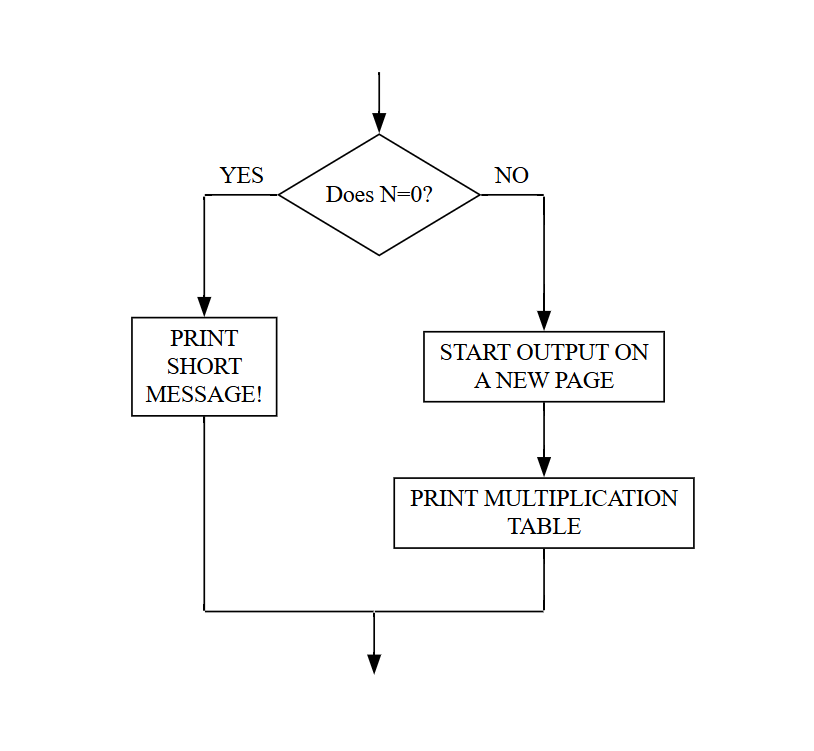
Sometimes, at some point in the computation, we shall need to make a
choice between two courses of action. In our earlier program to read a
number (N) as data and print the corresponding multiplication table, we
might feel that if N turns out to be 0, it would not be worth printing
a 0-times table, but that instead we should print a brief explanatory
message. To achieve this, we should need to arrange that once a value
for N has been read, we test to see whether or not N equals 0. The flow
of control would be:
and one way of writing the program would be:
begin
comment This program follows the flow diagram above.
integer N
READ (N)
if N = 0 then start
PRINT STRING ("NOT WORTH PRINTING 0-TIMES TABLE")
NEWLINE
finish else start
NEWPAGE
PRINT TABLE OF (N)
finish
end of program
It is worth noting that the above program would have exactly the same
output in all cases if we swopped over the two alternative routes, and
at the same time negated the condition; that is wrote: if N≠0 ...
__________________________________________________________________
begin
comment The condition has been negated.
integer N
READ (N)
if N ≠ 0 then start
NEWPAGE
PRINT TABLE OF (N)
finish else start
PRINT STRING("NOT WORTH PRINTING 0-TIMES TABLE")
NEWLINE
finish
end of program
(ii) Omitting else
It quite often happens that one of the two alternative paths involves
taking no action. In the above program, for example, we might decide
that in the N = 0 case we should refrain from printing anything at all,
even the 'NOT WORTH PRINTING' message. If there are no instructions to
go between the second start and finish, the whole of this section,
including the keyword else, are omitted. This gives:
begin
comment This program will produce no output if
comment N turns out to be 0.
integer N
READ (N)
if N ≠ 0 then start
NEWPAGE
PRINT TABLE OF (N)
finish
end of program
(iii) Omitting start and finish
If there is only one simple instruction between the start and finish,
then the start and finish can themselves be omitted, and the one
instruction is put in place of the start. Thus, if we decide to omit
the NEWPAGE instruction, we can use the following very useful and
simple form of conditional instructions.
if N ≠ 0 then PRINT TABLE OF (N)
and another useful abbreviated form permits if.... then .... else in
one line.
if N = 0 then PRINT STRING ("NOT WORTH IT") else PRINT TABLE OF (N)
__________________________________________________________________
(iv) Further conditions.
So far, conditional clauses have involved comparison of two numerical
quantities either for equality (=) or for non-equality (≠). The four
other natural comparisons will be written in normal mathematical
notation, namely: >, ≥, <, ≤ meaning "greater than", "greater than or
equal to", "less than" and "less than or equal to" respectively.
For input to the computer, however, the non-availability of the characters
≥ and ≤ leads us to represent these by two characters each. Thus:
Written form Form for input to computer
if A≥B then ..... %IF A >= B %THEN .....
if P+Q ≤ C-17 then ..... %IF P+Q <= C-17 %THEN .....
(v) Comparison of strings.
Two strings may be compared in the same six ways. It should be
remembered, however, that any spaces present count as part of strings.
Hence the 3-letter string "CAT" is NOT equal to the 4-letter string
"CAT ", as the latter has an extra space.
In the context of strings, "greater than" is taken to mean "comes LATER
IN DICTIONARY ORDER than". Hence
if S > "SMITH" then PRINT STRING (S)
would cause the string stored in S to be printed only if it came later
in dictionary order than "SMITH". A "dictionary order" relationship
between strings that contain characters other than letters of the
alphabet does exist, but will not be discussed at this stage.
(vi) Use of unless
Any condition written with an if clause may alternatively be expressed
in the negative form using an unless clause.
if N ≠ 0 then ..... )
) are exactly equivalent
unless N = 0 then ..... )
if A ≥ B then ..... )
) are exactly equivalent (Note:
unless A < B then ..... )
(Note < NOT ≤)
__________________________________________________________________
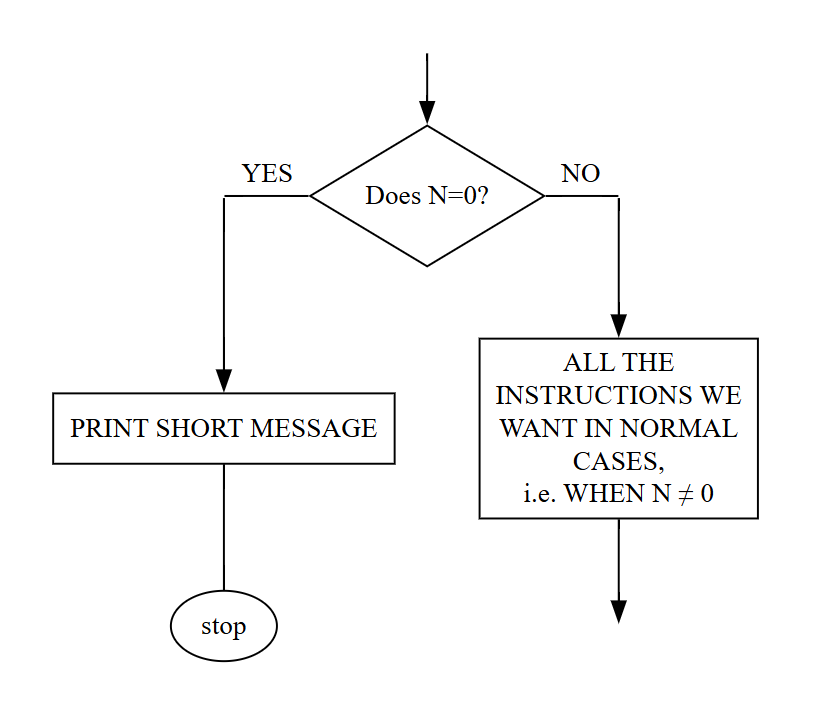
(vii) The instruction stop
The execution of a program automatically terminates upon reaching end
of program. In certain cases it is convenient to terminate prematurely
if some special circumstance arises (say, if N = 0), and for this
purpose the instruction stop is provided.
At first sight, we might think that this calls for an "if ..... then
..... else" construction, but since execution of a stop instruction
causes the program to stop, the following is simpler.
begin
integer N
READ (N)
if N = 0 then start
PRINT STRING ("NOT WORTH PROCEEDING")
NEWLINE
stop
finish
............... ; ! We only reach this point if N ≠ 0
...............
...............
end of program
If we are prepared to omit the warning message when N=0, the whole
start/finish group might be contracted to:
if N = 0 then stop
__________________________________________________________________
SECTION 4(B) - FURTHER FORMS OF CONDITION
(i) Writing conditions on the right.
In the case of conditional instructions that do not make use of start,
finish or else, we may write the instruction first, followed by the
condition. Thus the following are exactly equivalent:
if N ≠ 0 then WRITE (N,2)
WRITE(N,2) if N ≠ 0
and, of course, both are also equivalent to the following two:
unless N = 0 then WRITE (N,2)
WRITE(N,2) unless N = 0
The form to be chosen depends upon individual taste and upon which best
mirrors the way we wish to think about the condition being tested. Most
people would regard the third version above as inelegant, and therefore
generally to be avoided.
Remember Those alternative forms with the condition on the right are
NOT permitted when start, finish or else is involved.
(ii) Concatenating two instructions
If start/finish brackets enclose a very small (normally no more than
two) unconditional instructions, a concise form is permitted.
if N ≠ 0 then start
READ (X)
SUM = SUM + X
finish
may be written in one statement:
if N ≠ 0 then READ (X) and SUM = SUM + X
Note This is only allowed if both the instructions to be concatenated
are unconditional instructions. If one itself involves another
condition, we cannot avoid the start/finish. For example:
if N ≠ 0 then start
READ (X)
if X > 0 then SUM = SUM + X
finish
__________________________________________________________________
(iii) Compound conditions.
Examples are:-
if X > Y and Z = 13 then .....
if X > Y or Z = 13 then .....
if X > Y and Z = 13 and A + B = C + D then .....
if (X > Y and Z = 13) or A + B = C + D then ....
if A < B < C then .....
if A < B < C and C < D then ....
Notes
1. The third example gives three simple conditions connected by and.
The number of and's is not limited. The same applies to a sequence
of or's.
2. Where and and or are both used within the same condition, brackets
are required (as in the fourth example) to avoid ambiguity.
3. Following normal mathematical notation, the fifth example is a more
compact way of writing:
if A < B and B < C then ....
4. However, this contraction cannot be extended, and the following
would be faulted (But see the sixth example above for an acceptable
form)
if A < B < C < D then ....
5. The components of a multiple condition are examined from left to
right and testing ceases as soon as sufficient is known to decide
whether or not to carry out the main instruction. Thus, supposing
in the first example above, that the test for "X > Y" shows this
condition to be unsatisfied (i.e. X is not greater than Y) then it
is unnecessary to test for Z = 13 and so the value stored in Z will
not be examined.
6. or means "inclusive or". Thus the second condition above means:-
"if X > Y or Z=13 OR BOTH"
(iv) Conditions involving string resolution.
See Section 7.
__________________________________________________________________
SECTION 5 (A) - REPEATING GROUPS OF INSTRUCTIONS
(CYCLES)
If a group of instructions is placed between the bracketing keywords
cycle and repeat, then as soon as the last instruction of the group is
completed, we shall start all over again with the first instruction,
and so on .......
begin
comment This first version is unsatisfactory, because
comment there is nothing to make it terminate.
integer N
cycle
READ (N)
PRINT TABLE OF (N)
repeat
end of program
There are many ways of writing in the arrangements to terminate the
loop.
(i) Using a control variable
Suppose that we know exactly how many times we wish to go round the
loop; let it be 10 times. We must declare an extra integer to be used
to count 1,2,3,4.....10. Let us give it the name COUNT.
begin
comment The meaning of the cycle below is as follows
comment "First time round, set COUNT equal to 1,
comment Each time round, increase COUNT by 1 and
comment Stop the cycle at the end of the time when COUNT = 10"
integer N, COUNT
cycle COUNT = 1, 1, 10
READ (N)
PRINT TABLE OF (N)
repeat
end of program
__________________________________________________________________
The control variable (COUNT in the above case) must be an integer, but
there is no need for it to start with the value 1, nor for it to go up
in steps of 1. Furthermore, we can use the value of the control
variable to make slightly different things happen each time round the
cycle.
begin
comment The control variable, let us call it 'I' this time,
comment will take in turn the values 2, 7, 12, 17 and 22.
comment Thus we get 2-times, 7-times....22-times tables printed.
integer I
cycle I = 2, 5, 22
PRINT TABLE OF (I)
repeat
end of program
(ii) Using a conditional exit.
Any cycle/repeat loop will be terminated if an exit instruction is
obeyed.
begin
comment Below, when N turns out to be zero, the exit will
comment cause the cycle/repeat loop to be terminated. By
comment putting it before the printing instruction, we avoid
comment putting out the 0-times table.
integer N
cycle
READ (N)
if N = 0 then exit
PRINT TABLE OF (N)
repeat
comment When exit occurs, the program resumes from
comment immediately after the repeat (i.e. from here).
PRINT STRING("STOPPING NOW BECAUSE N = 0.")
NEWLINE
end of program
Note: The instruction exit is only valid inside a cycle/repeat loop and
causes an exit from that loop. If it appears between start/finish
brackets (which are themselves necessarily enclosed inside
cycle/repeat), it causes an exit from the enclosing cycle/repeat.
__________________________________________________________________
(iii) Using an until clause.
If, in the above, we decided to allow the 0-times table to be printed
before exiting from the cycle, we should need to move the line with the
conditional exit down one:
cycle
READ (N)
PRINT TABLE OF (N)
if N = 0 then exit
repeat
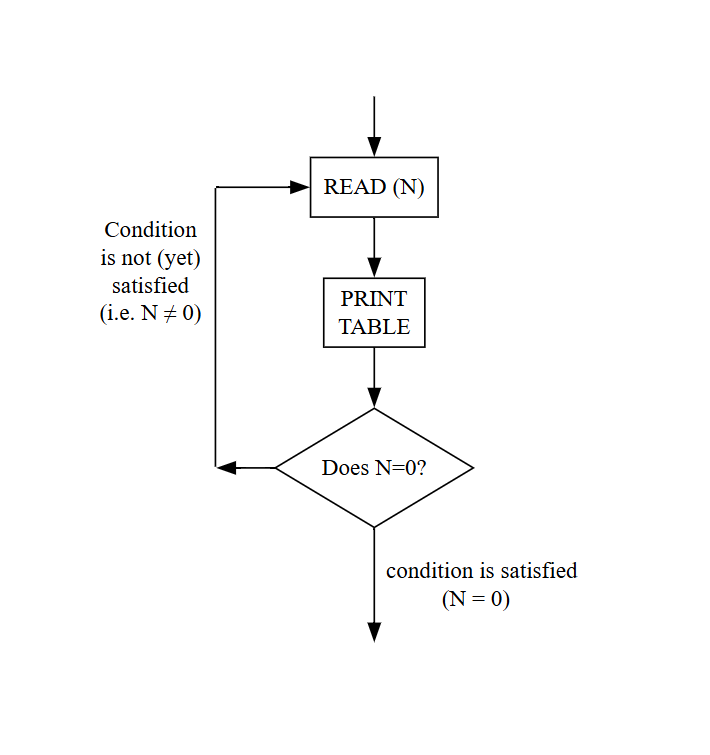
In a case like this, where the conditional exit comes immediately
before the repeat, we are allowed to write the loop in a slightly more
compact form:
until N = 0 cycle
READ (N)
PRINT TABLE OF (N)
repeat
Note that, although the condition is written on the line with the
cycle, the test is actually made at the end of the loop, which will
therefore always BE EXECUTED AT LEAST ONCE. The flow diagram looks like
this:
__________________________________________________________________
(iv) Using a while clause.
while and until clauses are negatives of one another in much the same
way as if and unless. (Remember that "if N ≠ 0" and "unless N = 0"
are equivalent), but they also differ in the TIME at which the test is
carried out. When controlling a cycle with a while clause, the test for
existing is made BEFORE carrying out the first instruction of the loop.
begin
comment This program reads a POSITIVE integer (N), then
comment calculates and prints the remainder when N is
comment divided by 7. This is done by repeated subtraction
comment of 7, continuing as long as N is >7. In case
comment N is originally less than 7, we need to test BEFORE
comment the first subtraction is carried out.
integer N
READ (N)
while N>7 cycle
N = N - 7
repeat
comment This program assumes POSITIVE input data.
PRINT STRING ("REMAINDER = ")
WRITE (N, 1)
NEWLINE
end of program
Note The above example is intended to be simple to understand. This is
not generally an efficient method of finding a remainder (unless N is
known to be small).
__________________________________________________________________
Some restrictions in the use of cycles.
(1) In the case of a cycle with a control variable (i.e. cycle I =
M,N,P+3) the controlling variable (I) must be an INTEGER variable. The
three integer expressions for first value, increment and final value
(i.e. M, N and P+3) may contain variables as this example shows, but
they must work out so that the cycle terminates. That is, the
difference between (P+3) and M must be an exact non-negative multiple
of N.
(2) A cycle may be controlled by ONLY ONE of (i) a control variable,
(ii) a while clause, (iii) an until clause. In other words it is
invalid to write:
until X = 0 cycle I = 1,3,N
On the other hand, a cycle controlled by any one of the above three may
also have an exit instruction within.
NESTING OF CYCLES
A cycle/repeat group may itself be enclosed in a further cycle/repeat.
A common need for this arises when operating on 2-subscript arrays.
A(1,1) A(1,2) A(1,3)
+------+------+------+
| | | |
+------+------+------+
| | | |
+------+------+------+
A(2,1) A(2,2) A(2,3)
cycle COL = 1,1,3 ;! This cycle will read three numbers from
READ(A(1,COL)) ;! the data file into A(1,1), A(1,2) and
repeat ;! A(1,3), thus filling the first row.
____________________________________
cycle ROW = 1,1,2 ;! These nested cycles will read six numbers
cycle COL = 1,1,3 ;! into A(1,1), A(1,2), A(1,3) followed by
READ(A(ROW,COL)) ;! A(2,1), A(2,2) and A(2,3).
repeat
repeat
____________________________________
cycle COL = 1,1,3 ;! But by reversing the order of the cycles,
cycle ROW = 1,1,2 ;! six numbers would be read in, column by
READ(A(ROW,COL)) ;! column. That is in the order A(1,1), A(2,1)
repeat ;! followed by A(1,2), A(2,2), followed by
repeat ;! A(1,3), A(2,3)
__________________________________________________________________
SECTION 5(B) - SHORTENED FORMS OF while/until
Cycles controlled by while or until clauses and containing a small
number (usually one) of simple unconditional instructions, may be
written in abbreviated forms, analogous to those used in place of
start/finish groups.
(i) Consider the previous example of taking a remainder when N is
divided by 7.
while N ≥ 7 cycle
N = N - 7
repeat
This can be contracted to either of the following equivalent forms:
(a) while N≥7 then N = N - 7
(b) N = N - 7 while N ≥ 7
(ii) A cycle to read and sum a set of numbers which are known to be
terminated with a zero, is (assuming SUM and X have been declared):
SUM = 0
until X = 0 cycle
READ (X)
SUM = SUM + X
repeat
Two possible and exactly equivalent contractions are:
(a) SUM = 0
until X = 0 then READ (X) and SUM = SUM + X
(b) SUM = 0
READ (X) and SUM = SUM + X until X = 0
__________________________________________________________________
SECTION 6 : LIBRARY ROUTINES & FUNCTIONS
These may be classified as follows:-
(a) Routines e.g. READ STRING (S)
NEWLINE
WRITE (I*J,3)
SORT STRING ARRAY (X,1,50)
PRINT STRING (S,T,)
READ (I)
(b) Functions (i) integer functions e.g. LENGTH (S)
INT (Y + 3.1)
(ii) real functions e.g. SQ RT (Y*Z)
(iii) string function e.g. DATE
A routine call is a complete instruction. A function, on the other
hand, is used as part of an instruction. Its purpose is to generate ONE
VALUE. This value must then be used as part (or the whole) of an
expression of appropriate type - integer, real or string.
For example, suppose the following declarations had been made:-
integer I,J,K ; real Y,Z ; string (50) S,T,U
Then the following would be possible statements:-
I = LENGTH (S) + 17
Z = SQ RT (Y * Z)
PRINT STRING ("TODAY IS ".DATE)
Note that we describe a function as an integer function, real function
or string function, depending upon the nature of the value it produces
as its result; this has nothing to do with the types of the parameters
given in brackets. In fact, neither of the examples of integer
functions given above takes integer-type parameters. LENGTH takes the
name of a string as parameter (but gives as its result an INTEGER
giving the number of characters currently stored in that string
variable). INT takes a real expression as parameter (but gives as its
result the INTEGER value nearest to the real expression.)
__________________________________________________________________
SPECIFICATION
Before we are able to use a library routine or function, we need to be
told:
(a) Its type: routine, integer function, real function or string function.
(b) Its NAME.
(c) The number and type of parameters required.
(d) What it does.
These first three are sometimes written as a "specification", in the
form:-
routine spec SORT STRING ARRAY (string array name X, integer A,B)
integer fn spec LENGTH (string name S)
string fn spec DATE
routine spec PRINT (real EXPR, integer DP1, DP2)
routine spec WRITE (integer EXPR, DP)
routine spec SWOP INTEGERS (integer name I,J)
In this context, the names used for the FORMAL PARAMETERS are of no
significance, and only serve to show how many actual parameters of each
type are required when we call the routine. We have (so far) nine types
of formal parameter:
Actual Parameter Needed
integer array name ) The name of an array of appropriate type
real array name ) (integer, real or string) e.g. A
string array name )
integer name ) The name of a single variable (or single
real name ) element of an array) of appropriate type (integer,
string name ) real or string) e.g. S A(7) B(I,J)
integer ) An expression of appropriate type (integer, real or string),
real ) except that an integer expression may be used in place of a real
string ( ) ) expression - (but not vice versa). e.g. I*J Y + 3.1 S.T
Note that WRITE takes two integer (i.e. integer expression) parameters,
while SWOP INTEGERS takes two integer name parameters. Hence we can use
the expression (I*J) in
WRITE (I*J,3)
but NOT as a parameter to the routine READ. In any case, it would be
hard to ascribe a meaning if we did write:
READ (I*J)
__________________________________________________________________
SUMMARY OF LIBRARY ROUTINES & FUNCTIONS AVAILABLE
(i) Common input and output ROUTINES.
These were described in Section 3: READ READ STRING READ ITEM
WRITE PRINT PRINT FL
PRINT STRING NEWLINE NEWLINES
NEWPAGE SPACE SPACES
(ii) STANDARD INTEGER FUNCTIONS
In the tables below, the type of parameters taken by each function will
be indicated in brackets after the NAME of the function.
Name Parameters The value calculated is:
INT (real X) The nearest integer to the real expression given as
parameter, X.
INT PT (real X) The integral part of X. Note that INT PT(3.73) is 3,
but that INT PT(-3.73) is -4.
IMOD (integer I) The modulus (absolute value) of I. Hence, IMOD (-3)
gives +3.
REM (integer I,J) The remainder when I is divided by J.
*** Provided for Computer Science 1 students - not in standard IMP. ***
LENGTH (string name S) The number of characters in the string variable S.
(iii) Standard STRING FUNCTION
FROM STRING (string name S, integer I,J) A copy of the Ith to the Jth
characters (inclusive) of S. The string variable S
is itself unaltered. Also see section 7.
__________________________________________________________________
(iv) Standard REAL FUNCTIONS
Name Parameters The value it calculates:
SQ RT (real X) The (non-negative) square root of X.
MOD (real X) The absolute value of X.
e.g. MOD (-3.73) = 3.73
FRAC PT (real X) The fractional part of X
e.g. FRAC PT (3.73) = 0.73
FRAC PT (-3.73) = 0.27
LOG (real X) The logarithm to base e.
EXP (real X) eX.
SIN (real X) The usual trigonometric functions, but note that X is in
radians.
COS (real X)
TAN (real X)
ARCSIN (real X) sin−1 X, where |X| ≤ 1 and the result is
in the range -π/2 to π/2.
ARCCOS (real X) cos−1 X, where |X| ≤ 1 and the result is
in the range 0 to π.
ARCTAN (real X,Y) tan−1 (Y/X) with the result in the range -π to +π.
If X > 0, the result is in the 1st or 4th quadrant. If
X < 0, the result is in the 2nd or 3rd quadrant.
__________________________________________________________________
(v) TIME, DATE & CPU TIME
Name Parameters The value it calculates is:
TIME NONE The time of day when the function is called, given as an
8-character STRING. For example: "14:27:31" (24-hour clock)
DATE NONE The date when the function is called, given as an 8-character
STRING. For example: "27/10/76"
CPU TIME NONE This gives a REAL number, for the amount of time in
seconds spent by the Central Processing Unit on the execution of this
program, up to the time of calling the function. Since the starting
time for this "clock" is undefined, this function should always be
called TWICE, and the difference between the two values taken. The
result is accurate to 0.001 seconds.
***NOTE Users other than Computer Science 1 students will need to give
an external specification before using any of the above three
functions. This takes the form:
external string fn spec TIME
external string fn spec DATE
external real fn spec CPU TIME
(vi) PRIVATE LIBRARIES
Computer Science 1 students should also look in the supplement of
additional library routines and functions provided for the class.
(vii) OTHER STANDARD LIBRARIES
Information on these is issued by the ERCC, but will not be required by
Computer Science 1 students.
__________________________________________________________________
SECTION 7 : MORE OPERATIONS ON STRINGS
STRING RESOLUTION
This is an instruction peculiar to strings and it allows us to search a
string for the (first) occurrence of some sequence of characters. For
example, suppose we have made the assignment
S = "JOHN SMITH, 8 BLANK TERRACE, EDINBURGH. TEL 668 1212"
then
S → T.(", ").U
will assign to T a copy of the characters found in S before the first
occurrence of the expression in brackets (i.e. comma space) and to U a
copy of those after it. S will REMAIN UNALTERED. More generally, we
have on the right a sequence of alternate string expressions in
brackets and string variables. Returning to the above,
S → NAME.(", ").ADDRESS.(" TEL "). PHONE NO
will cause JOHN SMITH to be assigned to string variable NAME,
8 BLANK TERRACE, EDINBURGH. to ADDRESS
and 668 1212 to PHONE NO.
Notes
(a) The expressions in brackets may be general string expressions
(variables, constants, functions, etc.) but the string variable names
which alternate with them, and appear without brackets, may only be
variables since values are to be assigned to them.
(b) If the expression sought does not occur, the program is terminated
with a run-time fault.
CONDITIONS INVOLVING STRING RESOLUTION
The condition
if S → P.("*").Q then ....
tests to see if S can be resolved in this way. If it can, copies of the
components are assigned to P, Q and, of course, the instruction at
..... is carried out. If not, none of these events takes place.
The resolution operator (→) is not allowed in a two-sided condition. Hence
if T = S → P.("*").Q then ....
is invalid, but could correctly be written
if T = S and S → P.("*").Q then ....
__________________________________________________________________
TAKING A FIXED PORTION OF A STRING (FROM STRING)
The string function FROM STRING (parameters: string name S, integer
I,J), gives as its result a copy of the Ith to the Jth characters
(inclusive) of the string S.. It LEAVES S UNALTERED. For example, if
string variable P is currently storing:
MARY QUEEN OF SCOTS
then the instruction:
Q = FROM STRING (P,6,10)
will assign to Q the 5-character string: QUEEN
LENGTH OF A STRING (LENGTH)
The integer function LENGTH (parameter: string name S) gives as its
result the number of characters in the string currently stored in S.
Thus with the value in P as above, an instruction:
I = LENGTH (P)
would result in the value 19 being assigned to I.
LOOK-AHEAD IN THE DATA FILE (NEXT ITEM)
Sometimes we shall wish to 'look ahead' to see what the next character
in the data file is, without actually reading it. For example, to find
out whether or not it is safe to try to read a number with the READ
routine. (If the next character in the data is a letter, then an
attempt to use READ will cause the program to be faulted.)
The string function NEXT ITEM gives as its result a 1-character string
corresponding to the next character in the data file, BUT LEAVING THAT
CHARACTER OFFICIALLY UNREAD, so that it is still there to be used again
when we give an instruction to read it officially. This function takes
NO PARAMETERS. The value of the function may be assigned to a string
variable, but rather more frequently our idea of 'looking ahead' is to
decide whether or not it is safe to proceed. For example:
if "0" ≤ NEXT ITEM ≤ "9" then READ (X)
Note that although the above check is sufficient to ensure that it is
safe to use "READ", it is not always necessarily what we want - the
next item might be a space or newline, and the character AFTER THAT
could still be a digit 0-9.
__________________________________________________________________
SPECIAL STRING CHARACTERS.
**** The facilities on this page are not part of standard IMP ****
(i) NEWLINE CHARACTERS. (SNL)
If we wish to write down the string constant consisting of one newline
character, this can look a bit awkward and inelegant.
READ ITEM (S)
if S = "
" then COUNT = COUNT + 1
To avoid this inelegance, we can write SNL (standing for STRING NEW
LINE) instead. Thus the above becomes:
READ ITEM (S)
if S = SNL then COUNT = COUNT + 1
(ii) END DATA FILE (SEM)
If we wish to test to see whether we have reached the end of our
data file, we can read an item, and test to see if it is the end of file
marker, written SEM (standing for String END OF MESSAGE).
READ ITEM (S)
if S = SEM then stop
(iii) SKIPPING ITEMS IN THE DATA FILE (SKIP ITEM)
The routine SKIP ITEM (parameters NONE) simply reads a character from
the data file but makes no use of it ('throws it away') so that the
next character after it in the file is now next in line to be read.
while NEXT ITEM = " " or NEXT ITEM = SNL then SKIP ITEM
__________________________________________________________________
SECTION 8 : NUMERICAL AND STRING EXPRESSIONS
We have already seen any places where integer, real and string
expressions are written in IMP programs - on the right-hand side of
assignment instructions, in conditions and as actual parameters to
routines (when parameters are called by value). Integer expressions are
also used as bounds in array declarations, as array subscripts and as
bounds for cycles. String expressions can also be used between the
brackets of string resolution instructions such as:
S -> T.(............).U
While noting that in all the above cases we can use any expression of
the correct type, there some cases in the language where we are
constrained to write a constant, rather than an expression. Such places
are indicated by .... in the following:
(a) As the maximum length in string declarations.
string (....) array PETE (M : N+1)
(b) In the bounds for CONST arrays (also OWN arrays, described later).
In the list of initial values given to CONST and OWN arrays.
const integer array TABLE (.... : ....) = .... , .... , .... ,
INTEGER EXPRESSIONS Consist of:
Integer variables ) connected by the operators:
Integer constants (e.g. 45) ) + - * // **, where * is multiplication,
Integer functions ) // division and ** is for
exponentiation (raising to a power).
NOTE The result of integer division (using the operator //) is rounded
down. The result of 7//2 is the integer 3.
REAL EXPRESSIONS Consist of:
Real OR integer variables ) connected by any of the operators:
Real OR integer constants ) + - * / or **.
Real OR integer functions )
NOTES (1) Real division (using /) involves no more rounding than is
necessary to match the precision available in real variables.
(2) Integer operands (variables, constants and functions) may be used
in real expressions, but not vice versa.
__________________________________________________________________
NOTE (3) The exponentiation operator () raises operands to a power, but
this power must be an integer (positive or negative). Thus X**3
represents X3.
(4) Apart from an initial + or - sign, all arithmetic operators must
appear directly between a pair of operands; two adjacent operators are
not allowed. Thus X−3 will have to be written as X**(−3) and not as X**−3.
(5) Real constants may be in either fixed point form: 3.725 or in
floating point form: 1.732e3 meaning 1.732×10³
1.732e−3 meaning 1.732×10⁻³
The constant π (i.e. 3.14159265.....) may be written in IMP programs as PI
(or % or £ or $, depending upon the particular compiler and input device in
use).
STRING EXPRESSIONS Consist of:
String variables ) connected by the operator
String constants (e.g. "MORRIS 1300") ) for concatenating, which
String functions ) is a full stop (.)
NOTE ON STRING CONSTANTS.
String constants are written between quotes, and may consist of up to
255 characters. The quotes marking the begining and end of the string
do not form part of the string. Hence
"THE CAT"
is a string of length 7 (6 letters and 1 space).
The empty or NULL string (of length 0) is of course represented by two
quotes with nothing between them, i.e. ""
This should not be confused with a string consisting of one or more
spaces, which might be " " one space or " " two spaces, etc.
Newline characters can appear in strings like this: "THIS STRING IS
SPREAD OVER TWO LINES"
If a quote character is required in a string, it is immediately
followed by another, to show it is not a terminating marker.
"WHO SAID ""NO""?" is the way to write the string: WHO SAID "NO"?
__________________________________________________________________
PRECEDENCE OF ARITHMETIC OPERATORS.
If we consider the expression A+B*C we might think of evaluating it in
two ways, i.e. as (A+B)C or as A+(B*C). It is easily seen that these do
not in general give the same value. So we have precedence rules which
define the order of evaluation in the absence of brackets. For two
adjacent operators (like * and + above), the operation of the higher
precedence in the table below is carried out first.
** (highest precedence)
* or / or //
+ or - (lowest precedence)
Where two adjacent operators are of equal precedence according to the
table the one appearing to the left in the expression to be evaluated
takes precedence.
We can always use brackets to over-ride the above rules of precedence.
When in doubt it is wise to insert brackets for safety and clarity.
Extra brackets do no harm.
The 'left-hand precedence' between + and - agrees with normal
(mathematical) usage,
e.g. By A-B+C we mean (A-B)+C and not A-(B+C)
EXAMPLE MEANING
A/B*C (A/B)*C
A/(B*C) (A)/(B*C)
A**B*C (A**B)*C
A**(B*C) (A)**(B*C)
Note that it is necessary to bracket denominators containing more than
one term. A common mistake is to write A/2B when A/(2B) is intended.
MODULUS SIGNS *** WARNING - SEE BELOW ***
If we wish to take the absolute value of an expression, we enclose the
expression between exclamation marks. Thus
!X-Y!
yields the (positive) difference between X and Y. This operation may be
applied to either integer or real expressions, and gives a result of
the same type as the original expression.
*** WARNING *** This modulus operator may soon be removed from some IMP
compilers. Use MOD and IMOD instead. (See section 6.)
__________________________________________________________________
SECTION 9 : INNER BLOCKS - LOCAL AND GLOBAL VARIABLES.
Inside a program we may use an inner block. Its structure, with its
local declarations at the head, and its instructions following, is
identical to that of the main program, except that it is terminated by
end instead of end of program. An inner block may be regarded as a
compound instruction.
begin ) )
...... ) declarations )
...... ) )
...... ) instructions )
...... ) )
begin ) )
...... ) declarations ) ) )
...... ) ) ) )
) inner block ) )
...... ) instructions ) ) )
...... ) ) ) )
end ) )
end of program
One case where this is useful is when we require to declare an array
whose bound is not known until some part of the calculation has been
completed. For example:-
begin
integer N
READ(N) ;! N is the size of array required
begin
integer array A (1:N)
......
......
......
end
end of program
__________________________________________________________________
LOCAL AND GLOBAL VARIABLES
It is important to appreciate the sphere of influence of the
declarations made in the inner and outer blocks.
A declaration appears at the head of a block and normally remains valid
throughout that block until cancelled by the end terminating the block.
It also remains in force upon descent to an inner block, UNLESS the
same name is declared in the inner block. In the latter case, the
variable is held in abeyance while the machine is executing the inner
block, coming into force again when the end of the inner block is
reached.
Within any particular block, we call a variable declared within that
block a LOCAL VARIABLE while one declared in any exterior block is
called a GLOBAL VARIABLE.
These points are illustrated in the following example:
(i) begin (ii) begin
integer A integer A
..... .....
A = 1 A = 1
begin begin
integer A,B,C integer B,C
..... .....
B = 1 B = 1
C = 4 C = 4
A = B + C A = B + C
end end
WRITE (A,2) WRITE (A,2)
end of program end of program
Here the name A refers to Here A is global to
quite distinct variables the inner block since
in the inner block and the this time A has not been
outer block. The WRITE re-declared. In this case
instruction will print the WRITE instruction
the value 1. will print the value 5.
SCOPE OF VARIABLES.
It is important to realise that on leaving a block, all local variables
declared within that block are lost. Thus in the examples above, if the
WRITE instruction on the penultimate line had attempted to write B or
C, the program would have been faulted.
Although inner blocks will not be needed very often, the idea of local
and global variables and their scope, is most important. In the next
section on defining our own ROUTINES and FUNCTIONS, the same principle
applies.
__________________________________________________________________
SECTION 10 : DEFINING OUR OWN ROUTINES & FUNCTIONS
(A) ROUTINES
When designing a program to solve a problem, we first try to decompose
the problem into smaller elements. This enables us to view the
structure of the program as a whole, without initially having to bother
about the fine detail of all the steps. Also, it often turns out that
essentially the same sequence of instructions is required in several
places in the program. We may also recognise that particular sequences
may be of use in the future for similar programs. It is therefore very
convenient to be able to define our own routines, which may then be
used in our program in the same way as the library routines.
Before we can call one of our own routines in a program, we must make
sure its name, and the number and type of parameters required, is
declared. This may be done by placing a specification (spec) among the
declarations at the head of the program. The form of the spec is
exactly as used in the discussion on library routines, and indicates
that the details of the routine will be given in a routine block later
on in the program. Alternatively, we can, in all but exceptional cases
described later, place the whole body of the routine at the head of the
program, where it may be thought of as a declaration of name,
parameters and what the routine does. The body of the routine has a
structure similar to that of a main program except that in place of
begin and end of program, we have routine ............ and end. Between
these we put the local declarations (if required), followed by the
instructions. For example, anyone not having access to the Computer
Science I library routine "SWOP INTEGERS" could add it for himself by
inserting four lines as follows:-
begin
routine SWOP INTEGERS (integer name I,J)
integer K ;! local variable for a copy of I
K = I ; I = J ; J = K ;! while value of J is moved to I
end
comment The above routine for swopping any two integers is now
comment available throughout the program to follow
integer P,Q
integer array A (1:10)
........
........
SWOP INTEGERS (P,Q) ;! this first routine call causes
SWOP INTEGERS (A(1),A(10)) ;! the routine above to be carried out
........ ;! but with P and Q in place of the
........ ;! dummy names I and J, respectively.
end of program ;! second time: A(1) and A(10).
__________________________________________________________________
Note that the positioning of the routine body at the head of the
program has nothing to do with the time the routine will be executed -
the routine will be executed when it is CALLED, that is at the line
"SWOP INTEGERS (P,Q)". In the call, we are told that the ACTUAL
PARAMETERS P & Q are to be used in place of the dummy FORMAL PARAMETERS
(I and J).
Another example:
begin
routine READ REAL ARRAY (real array name X, integer A,B)
! This routine reads real numbers from the data file into
! the real array X, from X(A) to X(B) inclusive.
integer I
cycle I = A, 1, B
READ (X(I))
repeat
end
real array A,B (1:100), C (0:20)
READ REAL ARRAY (B, 1, 100) ;! read 100 numbers into array B.
READ REAL ARRAY (A, 51, 100) ;! read 50 numbers into array A.
READ REAL ARRAY (C, 0, 20) ;! read 21 numbers into array C.
...............
...............
...............
end of program
Note This routine is defined with a formal parameter real array name.
This means that it can only be used to act upon a real array, and
furthermore only upon a 1-dimensional real array. Unfortunately,
separate routines will have to be defined if we wish to read a sequence
of integers into an integer array, or real numbers into a 2- or
3-dimensional array.
RETURNING FROM ROUTINES
See notes two pages on for the use of the instruction return
__________________________________________________________________
(B) FUNCTIONS
These may be added at the head of the program in a manner almost
identical to that for a routine. The first line of the function
indicates the type of function it is (integer, real or string) and
since the purpose of a function is to produce ONE VALUE to be used
(e.g. in an expression), we need a special form of instruction to
indicate when the result has been calculated. This takes the form:
result = .....
begin
integer fn LARGER OF (integer P,Q)
! this function finds the larger of two integer values.
if P > Q then result = P else result = Q
end
real fn LARGEST IN (real array name X, integer A,B)
! This function finds the largest member of X from X(A) to X(B), inclusive
integer I ; real LARGEST
LARGEST = X(A) ;! Try this, compare all others with it
cycle I = A+1, 1, B ;! This assumes A < B. See note over page.
if X(I) > LARGEST then LARGEST = X(I) ;! On finding bigger one, take it.
repeat
result = LARGEST
end
integer I,J,K,L, M; real Y,Z ;! MAIN PROGRAM STARTS HERE
real array A(1:100)
......
......
I = LARGER OF (J,K) + LARGER OF (L-1,M)
Z = LARGEST IN (A,51,100)
......
......
end of program
__________________________________________________________________
NOTES ON FUNCTIONS
(a) On reaching "result = ....." in a function, this result is accepted
as the value, and no further instructions in the function are
performed. Hence the first function above could equally well be
written:-
integer fn LARGER OF(integer P,Q)
if P > Q then result = P
result = Q
end
since the line "result = Q" is only reached if the condition "P > Q"
has failed.
(b) In the second example, it is for the same reason that we must defer
giving "result = " until after completing the cycle/repeat.
(c) The second example assumes that B is strictly greater than A. If we
wish to allow for the possibility of them being equal, we could add, as
the first instruction of the function:-
if A = B then result = X(A)
(d) Since the purpose of a function is to produce ONE VALUE, we should
not want to assign new values to any of the parameters during the
course of executing the function. For this reason, we should expect to
call all parameters by value. In fact, Imp only allows arrays to be
called by name. This forces us to call X as a real array name in the
second function above.
RETURNING FROM ROUTINES
We have seen above that we leave a function on executing the
instruction result = .... , and that this need not necessarily arise at
the textual end of the function.
The event that causes the program to leave a routine may be either
reaching the textual end of the routine or executing the instruction
return. This instruction may, like the result = of a function, be made
conditional. For example, if we have a routine to sort an array into
some order from X(A) to X(B), say, we may wish to insert a conditional
return at the begining to deal with the possibility that the array has
only one (or even less) elements:
if A > B then return
__________________________________________________________________
SECTION 11 : RECURSIVE ROUTINES AND FUNCTIONS.
To write a routine to sort an array (say, an integer array) into
ascending order by the method of 'selecting the largest', we might
start planning as follows:
(i) Find the position of the largest member of the array.
(ii) Swop this largest member with the right-hand member.
Position of the largest
X(a) v X(b)
+---------------------------------------------------------------------+
| | | | | | | | | | | | | | |
+---------------------------------------------------------------------+
^ ^
+----------------------------------+
swop
We now have one element (the right-hand one) in its final resting
place; it can now be disregarded and the rest of the problem is simply
to sort the remaining members of the array. Now, this is exactly the
same in nature as the original problem, but one smaller, so that step
(iii) is:
(iii) Sort an array one smaller than the original one.
The Computer Science I library contains a function and a routine to
carry out steps (i) and (ii) above. Step (iii) can be carried out by
calling our main sorting routine from within itself, a process known as
RECURSION.
routine SELECT SORT (integer array name X, integer A,B)
integer P ;! Using C.S.1 special routines.
P = POS BIG INTEGER (X,A,B) ;! Find posn. of largest.
SWOP INTEGERS ( X(P),X(B) ) ;! Swop it with the end one.
SELECT SORT (X,A,B-1) if A < B-1 ;! Leaving the end one
end ;! alone,sort the rest.
NOTES (1) It is important to make sure that a routine or function
written recursively will not carry on calling itself indefinitely. In
this case, each call on SELECT SORT acts on an array of one less
elements than in the previous call, so that it will suffice to insert a
simple condition to miss out the recursive call when the array consists
of one element (which, of course, cannot help but be in the correct
order).
__________________________________________________________________
NOTE (2) In this case, the recursion can, if we wish, easily be avoided
by using a simple cycle instead. In more complex situations, this may
not be so easy, and recursion can provide a great simplification in our
thinking.
(3) The above version of the routine will fail if called with A and B
initially 'inside out', that is A>B. It is instructive to re-write it as follows:
routine SELECT SORT (integer array name X, integer A,B)
integer P
return if A > B ;! Nothing needs to be done.
P = POS BIG INTEGER (X, A, B) ;! Find largest.
SWOP INTEGERS (X(P), X(B)) ;! Swop it with the end one.
SELECT SORT (X, A, B-1) ;! Sort the remainder.
end
RECURSIVE FUNCTIONS.
Similarly, functions may be written recursively. Consider the problem
of finding the Highest Common Factor of two integers, P and Q, say,
using the Euclidean algorithm.
(i) Find the remainder (R), when P is divided by Q.
(ii) If R = 0, then the H.C.F. is Q.
(iii) Otherwise, we need to find the H.C.F. of Q and R.
integer fn HCF (integer P, Q)
integer R
R = P - P//Q * Q ;! Same as the CSL function REM
if R = 0 then result = Q ;! The HCF required.
result = HCF (Q, R) ;! We only reach here if R ≠ 0
end
NOTE Once again, our recursive function has an escape clause (if R = 0)
to ensure that it does not call itself indefinitely.
__________________________________________________________________
SECTION 12 : EXTERNAL ROUTINES AND FUNCTIONS
DEFINING EXTERNAL ROUTINES AND FUNCTIONS.
A file of external routines and/or functions takes the following form:
external routine A(integer array name X)
. . . .
end
external routine PRINT DECODED (string(31) S)
. . . .
. . . .
end
external real fn CUBE ROOT (real x)
. . . .
result = . . . .
end
end of file
This file is compiled in the normal way. After this, the routines A and
PRINT DECODED, and the real function CUBE ROOT may be used in any
program, provided that program contains an appropriate "external spec"
(see next page).
** WARNING When stored by EMAS, the names of your external routines and
functions are TRUNCATED to the first 8 characters. You must take care,
therefore, to avoid using two names with the same first 8 characters.
Notes (1) Unlike a main program, a file of external routines has no begin
statement. Instead of end of program, it terminates with end of file.
(2) If we require any global variables, accessible from two or more of
the routines or functions, these have to be declared as own or const
variables (see next section). (There is a third possibility, external
variables, described in the IMP language manual, but these are not
normally to be recommended).
__________________________________________________________________
CALLING AN EXTERNAL ROUTINE OR FUNCTION.
To use an external routine or function in a program, we give an
"external spec" - this is the same as the first line of the routine (or
function), with the keyword spec added.
begin
external routine spec PRINT DECODED(string(31) S)
external real fn spec CUBE ROOT (real X)
real X,Y
. . . .
READ (X)
Y = CUBE ROOT (X)
PRINT DECODED ("*A23B!PZ7R")
. . . .
. . . .
end of program
** WARNING ** Be very careful that the parameters you give for your
external spec are identical to those given for your external routine
(or function). NO CHECK is made when the program is run, and if the
parameter lists differ, then chaos will usually result. ("ADDRESS
ERROR" at run-time is a likely consequence).
GLOBAL VARIABLES FOR A FILE OF EXTERNAL ROUTINES.
If we require some global variables accessible from several external
routines in one file, it is no good declaring an ordinary variable at
the head of the file - being outside of a program or external routine,
this would be illegal. We are, however, allowed to declare either CONST
or OWN variables at this point. See section 2(iv) for CONST and section
13 for OWN variables. Note that it is also permissible to put a record
format statement at the head of a file of external routines in the same
way, and the format will apply to all the external routines.
__________________________________________________________________
SECTION 13 : OWN VARIABLES.
OWN variables are almost the same as CONST variables (which were
described in section 2(iv) - but avoiding the word 'variables' because
we were describing things that could not be varied). Storage space for
both OWN and CONST variables is allocated and initial values are
assigned when the program starts execution; the difference is that OWN
variables can subsequently be altered by the program.
On leaving a routine (or function or inner block), all variables
declared locally within that routine become inaccessible. However,
whereas ordinary variables then cease to exist (the space allocated to
them is normally re-used for some other purpose), OWN and CONST
variables continue in existence "behind the scenes". Thus if and when
the program returns to execute this routine on a later occasion within
the same run of the program, OWN and CONST variables will once again
become accessible and will contain the values left there at the end of
the previous visit to the routine. Note that the initial value given
with the declaration of OWN variables is assigned once, and once only,
each time the program is run.
routine ANYTHING
own integer I = 0
I = I + 1
. . . . . .
. . . . . .
end
Like any other local variable, I is of course only accessible from
within the routine (or from within any routine/function/block embedded
within the routine). When the program starts, I takes the initial value
0, as in the declaration. On reaching the instruction I=I+1 for
the first time, I will increase to 1. Assuming that none of
the later instructions within the routine alters I, it will still be 1
on leaving the routine; thus on entering the routine the next time, I
will start with the value 1 and immediately be increased by 1 to 2.
Thus I will always be storing an integer corresponding to the number of
times the routine has been entered. (Note that it will be the number of
times the routine has been entered since we started this present run of
the program - the fact that we ran it several times earlier to-day has
no bearing.)
Note An OWN variable declared at the head of a file of external
routines may be accessed from within any of them.
__________________________________________________________________
SECTION 14 : BYTE INTEGERS, SHORT INTEGERS, LONG REALS
BYTE INTEGERS, SHORT INTEGERS
To economise in storage it is sometimes convenient to declare:
short integer I ;! occupies 2 bytes (16 bits).
;! range of values stored: -32768 to +32767.
byte integer J ;! occupies 1 byte (8 bits).
;! range of values stored: 0 to 255.
Notes (1) Although short integers are seldom used, byte integers are
useful for storing symbols. See section 18.
(2) Short integers and byte integers may be used in any integer
expression.
(3) The value of an integer expression (including normal integer
variables) may be assigned to a short or byte integer, provided the
value obtained lies in the ranges given above.
(4) ** WARNING. Short or byte integer variables may not be used as the
control variable for cycles.
(5) Arrays may be declared in the obvious way:
short integer array A(0:999)
byte integer array B(1:2000)
(6) Name-type or value-type parameters to routines may be of type short
integer or byte integer.
LONG REALS
long real X,Y ;! each occupies 8 bytes (64 bits).
long real array Z(-1000:1000)
Long real variables can store the same range of values as real
variables, but to a greater precision (between 14 and 15 decimal digits
instead of between 6 and 7).
Note If the special statement reals long is placed at the head of a
program:
reals long
begin
this has the effect of turning all declarations and parameters of type
real into the corresponding ones of type long real. (Computer Science 1
students need not do this, as it is inserted for them automatically.)
__________________________________________________________________
SECTION 15 : RECORD VARIABLES.
Suppose that we wish to store the following data about some children:
(a) Name - Up to 30 characters. Use a string(30).
(b) Age in months - A byte integer will serve (Max. value = 255).
(c) Height in inches - Kept to nearest 0.1''. We need a real.
It will be convenient if we can store these three pieces of information
in one variable, which can be manipulated as a whole. For this we need
to define a new type of variable, known as a record. To define a new
type of variable, we first give a record format; having done that, we
are able to declare scalars and arrays as follows:-
record format BABY (string(30) NAME, byte integer AGE, real HEIGHT)
record R1, R2 (BABY)
record array KID (1:100) (BABY)
Because they have been declared as of type BABY, records R1, R2 and all
elements of record array KID consist of 36 bytes, like this:
NAME field AGE field HEIGHT field
(1+30 bytes) (1 byte) (4 bytes)
+---------------------------------------------------+
R1 | | | | |
+-+-----------------------------------------+-+-----+
R2 | | | | |
+-+-----------------------------------------+-+-----+
KID(1) | | | | |
+-+-----------------------------------------+-+-----+
: : : : :
: : : : :
+-+-----------------------------------------+-+-----+
KID(100) | | | | |
+-+-----------------------------------------+-+-----+
A complete record is referred to by its name (e.g. R2 or KID(12)).
Assignments to complete records must have on the right-hand side either
another record of the same format, or 0. For example:
R2 = KID(13) ;! All fields of KID(13) are copied to R2.
R1 = 0 ;! All fields of R1 are set to 0 (for numerical
;! fields) or to the null string (string fields).
Individual fields may be referred to separately, as shown on the next
page.
__________________________________________________________________
FIELDS WITHIN RECORDS.
To refer to an individual field, we give the name of the whole record,
followed by the underline character (_) and the name of the field
required.
R1_NAME is the NAME field of record R1. It can be treated as any other
string variable. For example:
PRINT STRING (R1_NAME)
R1_NAME = "A.B. SMITH"
R2_HEIGHT is the HEIGHT field of record R2. It can be treated as any
other real variable. For example:
R2_HEIGHT = R2_HEIGHT + 2.5
KID(3)_AGE is the AGE field of record KID(3). It can be treated as any
other byte integer variable. For example:
KID(3)_AGE = R2_AGE
WRITE(KID(3)_AGE,3)
ARRAY FIELDS WITHIN RECORDS.
Suppose that we wish to store records, each containing (a) the name of
a student and (b) an array of his marks in each of 12 examinations. A
suitable set of declarations might be:
begin
record format STUDENT (string(30) NAME, integer array MARK(1:12))
record array CSL (1:200) (STUDENT)
record A,B (STUDENT)
We can now refer either to a whole record (e.g. A or CSL(3k)), or to
the MARK field (which is an integer array) or to an individual element
of of a MARK array.
A_MARK is an integer array, giving the twelve marks stored in record A.
It can be treated as any other integer array, for example, it can be
passed as a parameter to a sorting routine:
SORT INTEGER ARRAY (A_MARK,1,12)
CSl(I)_MARK(J) is an integer variable, giving the mark in the Jth exam
of the student whose record is in CSL(I).
__________________________________________________________________
RECORDS AS PARAMETERS PASSED TO ROUTINES/FUNCTIONS.
Records and record arrays passed as parameters to routines or functions
may only be passed by name. In addition, each such parameter must be
followed by a record spec statement, indicating what type of record it
is. In the following example, note that the one record format statement
at the beginning of the program is valid within both the routines that
follow it, in accordance with the normal scope rules. It is also valid
for the declaration at the start of the main program.
begin
record format BABY (string(30) NAME, byte integer AGE, real HEIGHT)
routine SWOP RECORDS (record name X,Y)
record spec X (BABY) ;! Note that unfortunately, a separate spec
record spec Y (BABY) ;! statement is needed for each parameter.
record Z (BABY) ;! A dump variable, needed as usual.
Z = X ; X = Y ; Y = Z
end
routine SORT RECORD ARRAY (record array name R, integer A,B)
record spec R (BABY) ;! Takes same form as for scalars above.
integer I
cycle I = A,1,B-1
if R(I)_HEIGHT > R(I+1)_HEIGHT then SWOP RECORDS (R(I),R(I+1))
repeat
SORT RECORD ARRAY (R,A,B-1) if B-1 > A
end
! MAIN PROGRAM STARTS HERE
record array KID (1:1000) (BABY)
record P,Q (BABY)
etc. etc.
__________________________________________________________________
SECTION 16.
ROUTINES/FUNCTIONS AS PARAMETERS
Suppose that we wish to have one routine that will print a table of
square roots, cube roots or cosines, etc. as required. We clearly need
the name of the required function to be passed as a parameter, for
example:-
TABULATE (SQ RT)
TABULATE (CUBE RT)
TABULATE (COS)
In another case, we might wish to write a routine that would see how
long some nominated sorting routine took to sort an array of 100 random
numbers. In this case, a routine would need to be passed as a
parameter. For example:-
TIME SORTING BY (QUICKSORT)
TIME SORTING BY (BUBBLE SORT)
In a realistic example we should almost certainly need some further
parameters (e.g. a string to be printed as a heading for the table, the
size of the table to be printed, or of the array to be sorted, etc.,
etc.). For clarity, however, these will be omitted in the examples
below.
The routine/function is passed as a parameter in a fairly natural way,
except that one extra statement is needed: if the function or routine
being passed as parameter has the formal name F, we need a "spec"
statement to say what parameter(s) F itself takes. And, of course, the
actual functions used (e.g. SQ,RT, CUBE RT COS in the above) will have
to conform.
routine TABULATE (real fn F)
spec F (real X) ;! The actual function passed as
;! parameter must conform to this and
integer I ;! take just one real value parameter.
cycle I = 0, 1, 10
NEWLINE
WRITE (I,2)
PRINT(F(I),4,4)
repeat
NEWLINES(2)
end
__________________________________________________________________
An example of a ROUTINE passed as a parameter to a routine:-
routine TIME SORTING BY (routine ANYSORT)
spec ANYSORT (integer array name X, integer A,B)
integer array P(1:100) ;! Stores the numbers to be sorted.
integer I
real T ;! To measure the time taken.
cycle I = 1, 1, 100 ;! Fill an array with 100 random
P(I) = RANDOM INTEGER ;! numbers, using the function from
repeat ;! the CSL library.
T = CPU TIME
ANYSORT (P, 1, 100) ;! ANYSORT is the dummy name for any
PRINT (CPU TIME - T, 3, 3) ;! sorting routine, whose actual name
end ;! will be given when the routine is called.
MINOR NOTE.
In the example on the previous page, the routine TABULATE requires as
actual parameter a real function. In fact, the standard functions SQ RT
and COS are defined as long real functions. Although this distinction
has been irrelevant to us so far, it is significant when a function is
passed as a parameter. If we require to pass any of the long real
standard functions to our TABULATE routine, a simple way to reconcile
the parameters is to place the special statement reals long at the head
of each program or file of external routines concerned. This has the
effect of turning all declarations and parameters of type real into the
corresponding long real types. In fact, this is done automatically for
Computer Science 1 students.
__________________________________________________________________
SECTION 17 : INPUT AND OUTPUT STREAMS.
In all our discussion so far, we have assumed that all the data being
read by our input routines (READ, READ STRING, etc.) comes in one
STREAM from just one file (or input device); and similarly that all our
output is sent in one stream to just one file (or output device).
Depending upon the computer we are using and the operating mode, there
will be DEFAULT OPTIONS which, in the absence of instructions to the
contrary from the program, determine the devices to be used for the
input and output streams. These, and the methods of over-riding them,
are not part of our IMP program and do not concern us here. However, we
may wish to include instructions in our program to arrange for input
data to be taken from two or more different streams (coming from
different files/devices), or to send our output to two or more streams
(being stored or printed on different files/devices). To arrange for
this, we use the routines SELECT INPUT and SELECT OUTPUT, which both
take an integer value as parameter.
begin
real X
READ (X) ;! This comes from the default input
........ ;! stream, as no instructions to the
........ ;! contrary have been given.
SELECT INPUT(2) ;! From now on, until changed again,
READ (X) ;! input comes from STREAM 2.
........
end of program
NOTES (1) Output streams are selected in just the same way with the
routine SELECT OUTPUT.
(2) Computer Science I students can choose stream as follows: For
input: Input stream 1, 2, 3 or 0. (Input 0 is the console). For output:
Output stream 1, 2, 3 or 0. (Output 0 is the console).
(3) Other users will have to use one set of numbers for input streams
and a different set for output streams.
(4) ** WARNING ** Both input and output streams are buffered line by
line. Unfortunately, when we select a new stream we lose any data
remaining in any half-read line on the old input stream. A subsequent
re-selection of the old stream will resume reading at the beginning of
the following line. On calling SELECT OUTPUT, any half-complete line on
the old stream is terminated with a newline.
__________________________________________________________________
SECTION 18 : SYMBOLS
String variables, functions, etc., are designed to facilitate
operations upon non-numerical quantities. However, they suffer from the
inconvenient limitation of having a maximum length of 255 characters.
Moreover, to access an individual character (say the 7th) of string S,
we have to use the unwieldy function
T = FROM STRING (S, 7, 7)
We can, of course, store information in an array of 1-character
strings:
string (1) array S(1:1000)
but if we are going to have to store our non-numerical characters in
one-character units anyway, there is the alternative of storing them as
what are known as SYMBOLS. This is more economical in storage than
using one-character strings, but denies the facilities of concatenation
and resolution. Each symbol is regarded as equivalent to an integer in
the range 0 - 127, and thus symbols can be stored in integer or, for
economy of storage, byte integer variables. Corresponding to the
routines and functions so far considered for input and output of
strings, we have equivalent ones for operating on symbols being stored
as integers.
string (1) S, T, U integer I, J, K
READ ITEM (S) READ SYMBOL (I)
T = NEXT ITEM J = NEXT SYMBOL
** U = NEXT SIG ITEM ** K = NEXT SIG SYMBOL
** SKIP ITEM SKIP SYMBOL
PRINT STRING (S) PRINT SYMBOL (I)
PRINT STRING ("Q") PRINT SYMBOL ('Q')
U = "A" K = 'A'
if "A" ≤ S ≤ "Z" then ... if 'A' ≤ I ≤ 'Z' then ...
** if S = SNL then ... if I = NL then ...
** if S ≠ SEM then ... ** if I ≠ EM then ...
Notes (1) ** indicates facilities that are not part of standard IMP.
(2) Constant symbols are written single primes; constant strings are
written between double primes (quotation marks) as shown in the
examples above.
(3) The integers I, J, K above could, for economy of
storage, have been declared as byte integers.
__________________________________________________________________
CONVERSION BETWEEN ONE-CHARACTER STRINGS AND SYMBOLS.
string fn spec TO STRING (integer N)
integer fn spec CHAR NO (string name S, integer I)
TO STRING takes the symbol whose equivalent numerical value is N, and gives
as its result the same character, in the form of a 1-character string.
CHAR NO does the inverse: it takes the Ith character of string S and gives as its
result the same character as a symbol.
Examples of use.
integer I,J ; string (1) S ; string(10) T
I = CHAR NO (T,3) : ! I now stores a symbol
S = TO STRING (J) ; ! S now stores a 1-character string
Note From its name, one might expect that FROM STRING would be the
inverse of TO STRING, but it is in fact a quite different thing. (FROM
STRING copies a part of a string to form another string).
ARITHMETIC RELATIONSHIPS BETWEEN SYMBOLS.
Although we do not normally need to know what numerical values
correspond to different symbols, it is useful to know that successive
letters of the alphabet correspond to successive integers. Since
symbols are stored in integer, or byte integer, variables, we can carry
out addition and subtraction operations to convert from one letter to
another. Thus:
the expression 'A' + 1 gives 'B'
the expression 'Y' + 1 gives 'Z'
__________________________________________________________________
One case where this property is useful is in the declaration of an
array whose subscripts can be written as symbols.
integer array COUNTER ('A':'Z')
This would be the natural declaration if we wished to count the
frequency of occurrence of the different letters of the alphabet in a
piece of text. Another natural use would be to cycle from 'A' to 'Z'
setting these counters to 0.
cycle i = 'A',1,'Z'
COUNTER (i) = 0
repeat
LOWER CASE LETTERS
Lower case letters (a,b,...,z) can also appear as symbols. They have
different numerical values from those of upper case letters, but are
themselves ordered in the natural way. Thus:
the expression 'a' + 1 gives 'b'
the expression 'w' + 1 gives 'x'
CONVERSION BETWEEN UPPER AND LOWER CASE
Because of the above relationships, it is clear that:
the difference between 'A' and 'a' is the same as the difference
between 'B' and 'b' and as the difference between 'Z' and 'z'.
If, therefore, an integer I stores an upper case letter as a symbol,
then the corresponding lower case symbol is given by: I + 'a' - 'A'.
For example, we might write:
if 'A' ≤ I ≤ 'Z' then I = I + 'a' - 'A'
__________________________________________________________________
EXAMPLE Counting the letter frequency in one sentence of text. In order
to count upper and lower case letters together, we first convert all
lower case letters into corresponding upper case letters.
begin
integer array COUNT ('A':'Z') ;! for counting letters
integer I
cycle I = 'A', 1, 'Z' ;! initialise counters
COUNT(I) = 0
repeat
cycle
READ SYMBOL (I)
if I = '.' then exit ;! sentence ends on a full stop
if 'a' ≤ I ≤ 'z' then I = I + 'A' - 'a' ;! convert lower case to upper
if 'A' ≤ I ≤ 'Z' then COUNT(I)=COUNT(I)+1 ;! increment corresponding
repeat ;! counters.
cycle I = 'A', 1, 'Z' ;! tabulate results.
NEWLINE
PRINT SYMBOL(I)
WRITE (COUNT(I), 6)
repeat
NEWLINE
end of program
NUMERICAL VALUE OF THE DIGITS 0-9
Rather unfortunately, the "numerical value" of the symbol '2' is not
the decimal integer 2. However, the usual relationship holds:-
the expression '0' + 1 gives the symbol '1'
the expression '0' + 9 gives the symbol '9'
Thus if we have an integer variable holding an integer known to lie in
the range 0-9, we can get the corresponding symbol by adding '0'.
integer I,J
I = 7 ;! I stores the integer 7.
J = I + '0' ;! J stores the symbol 7.
__________________________________________________________________
SECTION 19 : POINTER VARIABLES.
Suppose that we have a routine
routine A (integer P, integer name Q)
then on entry to the routine, we assign to P the value of the actual
parameter given, but place in Q a POINTER to the actual parameter
corresponding. Whenever the routine refers to Q, we actually use the
location to which Q is pointing. In a rather similar way, we can
declare POINTER variables (integer name, real name, record name, etc.,
and also integer array name, string array name etc.).
begin
integer array A (1:100,1:100)
integer name Q ;! a POINTER variable
Q can now be made to point to any integer variable (say, A(I,J+3)) by
Q == A(I, J+3)
Q is now synonymous with A(I, J+3), and provides a concise may of
writing it.
Q = Q + 1 unless Q = 0
is a more concise way of writing the same instruction with A(I, J+3)
and it also saves the program from having to evaluate the address of
the same two-dimensional array element three times in rapid succession.
NOTES (1) It is clearly necessary to make Q point to an integer
location (using Q == ...) before it is meaningful to make an ordinary
assignment (Q = ......).
(2) An example of both a record name and an array name is:
begin
record format STUDENT(string(30) NAME, integer array MARK(1:12))
record array CS1 (1:200) (STUDENT)
record name R (STUDENT)
integer array name M
R == CS1 (14) ;! R is short for the 14th record.
M == CS1 (I)_MARK ;! M is an integer array
;! M(6) is an integer
__________________________________________________________________
SECTION 20 : MAPPING FUNCTIONS.
Mapping functions have some features similar to those of pointer
variables, in that they allow us to define how a whole set of
"alternative names" are to be allocated to certain variables.
As a practical example, note that some IMP compilers only allow us to
declare 1-dimensional arrays. In such cases, we are generally able to
obtain the convenience of 2-dimensional arrays by declaring a
1-dimensional array and allocating second names by means of a mapping
function.
A(0) A(1) A(2) A(3) A(4) A(5) A(6) A(7)
+------+------+------+------+------+------+------+------+
| | | | | | | | |
+------+------+------+------+------+------+------+------+
B(0,0) B(0,1) B(0,2) B(0,3) B(1,0) B(1,1) B(1,2) B(1,3)
real array A(0:7)
real map B(integer I,J)
result == A (4*I + J) ;! NOTE: use the == sign, as
end ;! with pointer variables. ***
Any reference to B(1,3), for example, will cause an entry to the
mapping function B; this will evaluate the resulting address you want
to use, namely "the same as the address of A(4*1+3)", which is A(7).
Notes (1) Other types of map (string map, integer map, etc.) are
written in a similar fashion.
(2) A map has the same structure as a function, except that the
instruction that causes the calculation to cease is result ==, rather
than result =. The right-hand side of this result instruction must be
something that gives the address of a variable of the correct type.
(i.e. a string variable for a string map, etc.)
(3) Since the result of a map is the address of the variable you want,
the map may (unlike a function) be used on the left as well as the
right-hand side of an assignment. For example:
B(1,0) = B(1,0) + 3
(4) Since each reference to B involves executing the body of the
mapping function, it is somewhat slow.
__________________________________________________________________
SECTION 21 : JUMPS, LABELS AND SWITCHES
In earlier sections, a number of methods have been described for
controlling the order in which instructions are executed. These have
involved:
(i) if ...... then ....... else .......
(ii) start & finish
(iii) while .......
(iv) until .......
(v) cycle & repeat
(vi) exit, stop, return,
result =
In a well-structured program, these will suffice for nearly all
purposes. If we wish to make a test to determine which of two
alternative paths is to be followed, then "if .... then .... else
....", together with "start & finish" will be quite convenient. If we
have more than two possible routes, however, we can be forced into
testing on a succession of conditions. To avoid great inefficiency, we
shall probably need nested start / finish groups, and this can soon
become cumbersome.
Suppose the following program structure is required. (Only three
possible routes are shown, for simplicity, but there could of course be
many more.)
__________________________________________________________________
To meet this requirement, we need the following:-
(i) At point (A), to be able to choose between going to one of points
(B), (C) or (D). If the choice involves testing for the value of an
integer expression, one convenient way of doing this is to use a SWITCH
JUMP.
(ii) Having divided into three (or more) paths, a properly structured
program will normally require to merge again, to point (E), say. This
can be achieved with SIMPLE JUMP instructions. Being simpler, these
will be described first.
JUMPS TO SIMPLE LABELS
Jump instructions meaning
-> L2 Jump TO the label L2. That is, instead of going on to the next
in struction in sequence, break off from here and resume from the
statement labelled L2.
Simple labels
L2: NEWPAGE The simple label, L2 say, is followed by a colon and placed
PRINT STRING(" ... ") on the left of the statement from which we wish to resume execution.
etc.
Notes (1) A simple label can be any legal Imp name. Such names do NOT
have to be declared. (But see next paragraph for switch label names
that do.)
(2) The label can come either earlier or later in the program
text than the corresponding jump instruction (i.e. we can jump either
forwards or backwards), but both must be within the same routine,
function or block.
(3) Owing to the high risk of introducing errors
that can be very hard to locate, jump instructions should NEVER be used
when any of the methods listed at the top of the page would be
applicable in a convenient way. (4) As an alternative to a name, it is
possible with some Imp compilers to use a positive integer as a label.
(5) The arrow (→) is printed with a "minus" and "greater than" sign.
__________________________________________________________________
SIMPLE JUMP INSTRUCTIONS (WITH CONDITION)
if N = 0 then -> L2
READ (X)
This is exactly the same as the previous example, except that the jump
only takes place if N = 0. Otherwise the program naturally continues
with the next instruction, say READ (X).
JUMPS TO SWITCH LABELS
If we wish to be able to jump to one of many points in the current
block, depending upon the value of an integer expression (I+J, say),
then we must DECLARE (in the usual place at the head of the routine,
function or block) an array of labels. For example:
switch S(6:10)
and the jump is written -> S (I+J)
and the labels are
S(6): ......
The structure of the program to implement the flow diagram given
earlier would now be like this:
begin
switch S (6:10) ;! a declaration of labels S(6) to S(10)
...... ;!
...... ;!
-> S (I+J) ;! evaluate I+J and jump to correct label
S(6): ...... ;! start here if I+J=6
......
-> L99 ;! NOTE THIS IS USUALLY WANTED *****
S(7): ...... ;! start here if I+J=7
......
-> L99
S(10): ...... ;! and here if I+J=10
......
......
L99: ...... ;! all routes meet together again here
......
__________________________________________________________________
Some notes on SWITCH LABELS
(1) As with simple jumps, the jump instruction and all the
corresponding labels must be inside the same block, routine or
function. In addition, the switch declaration must also be in the same
block, routine or function. That is, there is no possibility of using a
"global" switch name.
(2) The bounds of the switch declaration must be CONSTANTS. Hence
switch S (M:N) would be invalid.
(3) It is not necessary for all the labels in the range declared to
appear in the program. For example, S(8) and S(9) do not appear in our
example above. On the other hand, if, in that example, I+J were to
evaluate to 8 or 9 upon reaching the switch jump, then a run-time fault
would naturally occur.
(4) Without the ->L99 jumps, our example would have resulted
in the program running on from the instructions at S(6) to continue
with those that follow labels S(7) and S(10). This is not the structure
normally required. No such jump was needed at the end of the
instructions at S(10), since label L99: was on the next line anyway.
__________________________________________________________________
APPENDIX A
Preparing IMP Programs on Card Punches and On-Line Consoles
Certain symbols used in the written version of the language are not
available on card punches and On-Line Consoles. Special conventions
must be adopted as follows:
(1) Keywords
(a) Keywords (begin, end, etc) are punched with a % character
immediately preceding the letters. The word must then be separated from
other symbols by something other than a letter.
No spaces are permitted within one keyword, but, integer array name may
for example be regarded as one or three keywords and hence may be
punched as %INTEGER %ARRAY %NAME or %INTEGERARRAYNAME
(b) The % symbol acts as a shift character denoting that the sequence
of letters immediately following are to be interpreted as keyword
letters. It is cancelled by anything which is not a letter.
(2) Use of Spaces
Within the program (but not always within Job Control or data) spaces
may be inserted anywhere on a line to improve logibility. Such spaces
are disregarded by the compiler except that
(a) A space marks the end of the 'underlining' in keywords. (b) Certain
sequences of characters, known as STRINGS, are indicated by placing
them between quote characters ("). Between quotes, spaces DO count, so
that
"THE CAT"
is a string of length 7 (six letters and one space).
(3) String conventions on card input.
Anyone inputting IMP programs on cards should check on the current
conventions regarding quotation marks. In many cases, the quote
character on cards is taken to mean that the previous character is to
be disregarded. If such a convention is still in force, quote marks
must obviously not be used to delimit strings. In these cases, the
single prime (') is used instead. Example:
'THE CAT'
__________________________________________________________________
(4) Maximum length of line
Lines of program and data should be limited to 72 characters, as the
73rd and later characters will be disregarded. Most consoles only print
72 characters on a line, so you normally see when information is going
to be lost. Beware, however, when using cards as they can take up to 80
characters - although the card punches can and should be set to prevent
you going beyond column 72.
(5) Continuation onto a further line (program only)
Normally, each instruction in a program will be written on a separate
line. However, long instructions or declarations may be continued onto
a second (or further) line by punching %C before reaching the 72nd
position on the line. This facility is available in program only, not
within Job Control cards, nor data. Its chief use is for punching long
instructions of more than 72 characters.
(6) Composite characters
Certain composite characters have to be represented by a pair of
characters as follows:-
≥ is represented by the two characters >=
≤ is represented by the two characters <=
→ is represented by the two characters ->
← is represented by the two characters <-
(7) Characters not available on card punches and some consoles
If the input keyboard does not have the following characters, they are
represented as follows:-
≠ is input as #
Π is input as £ or $
¬ is input as ~
__________________________________________________________________
APPENDIX B - Notes on Fault Finding.
1. COMPILE TIME FAULTS.
(a) Recognised (numbered) Faults.
If the compiler recognises what appears to be the intended syntactical
structure of a statement, but detects a violation of some rule of the
language, a fault number and a short message describing the nature of
the violation will be printed out. The message normally gives enough
information for us to identify the fault. There are two possible
messages that are worthy of further comment here.
(i) FAULT 108 (EM CHAR IN STMNT) DISASTER
This means "End-of-message character in statement", and arises when the
compiler reaches the end of the source file without recognising our
end of program. We may have mis-spelt it, omitted it. This fault can also
arise if we try to compile an empty or non-existent file.
(ii) FAULT 19 (WRONG NUMBER OF PARAMETERS)
This can mean either the wrong number of parameters given for a routine
or the wrong number of subscripts given for an array access.
Either of these can sometimes occur through the omission of a comma in,
for example, PRINT (X+Y, 3 5) since spaces do not count in program, and
the 3 5 will be mistaken for 35 decimal digits being demanded before
the decimal point.
(b) Syntax Faults.
This means that the compiler has encountered a statement which does not
conform to any of the acceptable syntactical structures. To the human,
the fault often appears ridiculously trivial. For example:-
too few closing brackets: READ (A(N)
excess of commas: real X,Y,Z,
(c) Side-effects of earlier faults.
Example 1: cyclee I=1,1,10 ............ repeat
Here the first line will be faulted for syntax (faulty spelling of
cycle). As a consequence, the compiler will be unaware of our intention
to start a cycle and will find a spurious fault:
FAULT 1 (REPEAT TOO MANY)
__________________________________________________________________
Example 2: reall TOTAL
TOTAL = 0
.....
TOTAL = 0.7
Here the first line has a syntax fault and so the declaration will not
be acknowledged. Hence the second line will be faulted for "name not
declared". In an attempt to avoid the same fault message each
subsequent time you use TOTAL, the compiler will declare "TOTAL" for
you. Unfortunately it will guess you intended it as an integer and
subsequent attempt to assign a real value (0.7) to a supposedly integer
variable will cause yet another spurious fault (Real quantity used in
integer expression.).
2. RUN TIME FAULTS.
If your program fails at run time, you will receive the message
MONITOR ENTERED FROM IMP
The MONITOR will then proceed to give you several valuable items of
diagnostic information, as follows
(i) A message briefly describing the type of fault. Some notes on
interpreting these messages is given on the next page. (B.3)
(ii) The line number in your program where the failure occurred. ALWAYS
IDENTIFY THIS ON YOUR PROGRAM LISTING.
(iii) A list of the scalar variables in force at the time of failure,
and the values stored in them, if any. (Arrays are not printed, as they
are liable to be large, and hence time-consuming to print.)
DO NOT RUSH to alter your program until you have made use of the above
information to discover why it went wrong. If the cause of the failure
does not come easily, it often helps to work through part of the
program with pencil and paper, writing down the values you would expect
to be stored in the different variables at each stage of the
computation.
__________________________________________________________________
RUN-TIME FAULTS (continued)
It may be useful to give the following few notes in explanation of the
run-time fault messages. For further details, see the "Edinburgh IMP
Language Manual", section 13.
(i) ARRAY BOUND FAULT 21
Attempt to use A(21) when array A was declared only (1:20), for
example.
(ii) INPUT ENDED
You have tried to read more data (using READ, READ STRING, etc) than
you provided in the data file. This is often caused by getting the
program into an unintentional loop.
(iii) UNASSIGNED VARIABLE
You have tried to use the contents of a variable which has had nothing
put in it.
(iv) SYMBOL IN DATA 'R'
While trying to read a number, you have come across a symbol which
cannot form part of a number, for example: R.
(v) ILLEGAL CYCLE
You have tried to start a cycle with control variable which will never
terminate e.g.
cycle I = 2,K,10
where K = 3.
(vi) CAPACITY EXCEEDED
The string you are trying to assign is longer than the maximum length
declared for this variable.
(vii) NOT ENOUGH STORE
You are trying to use more of the store than is available to you. Note
that multi-dimensional arrays run away with a lot of space.
(viii) DIVIDE ERROR
Usually a division by zero.
__________________________________________________________________